
Website Icon

Web Design

Bringing you user-friendly, creative and clean website designs.

vision_icon

Marketing

Inclusive business marketing strategies for all business types.

Printer icon

Brand Design

A brand for a company is like a reputation for a person.

camera icon 2

Photography

Time to add some personality to your brand.

VIEW ALL SERVICES

All work
Software Custom business system

Business Management Dashboard

One system across sales, pre-sales, project management, operations, procurement, finance and the executive view. Every department works in its own screen, and the numbers move through the business by themselves.

Test the software
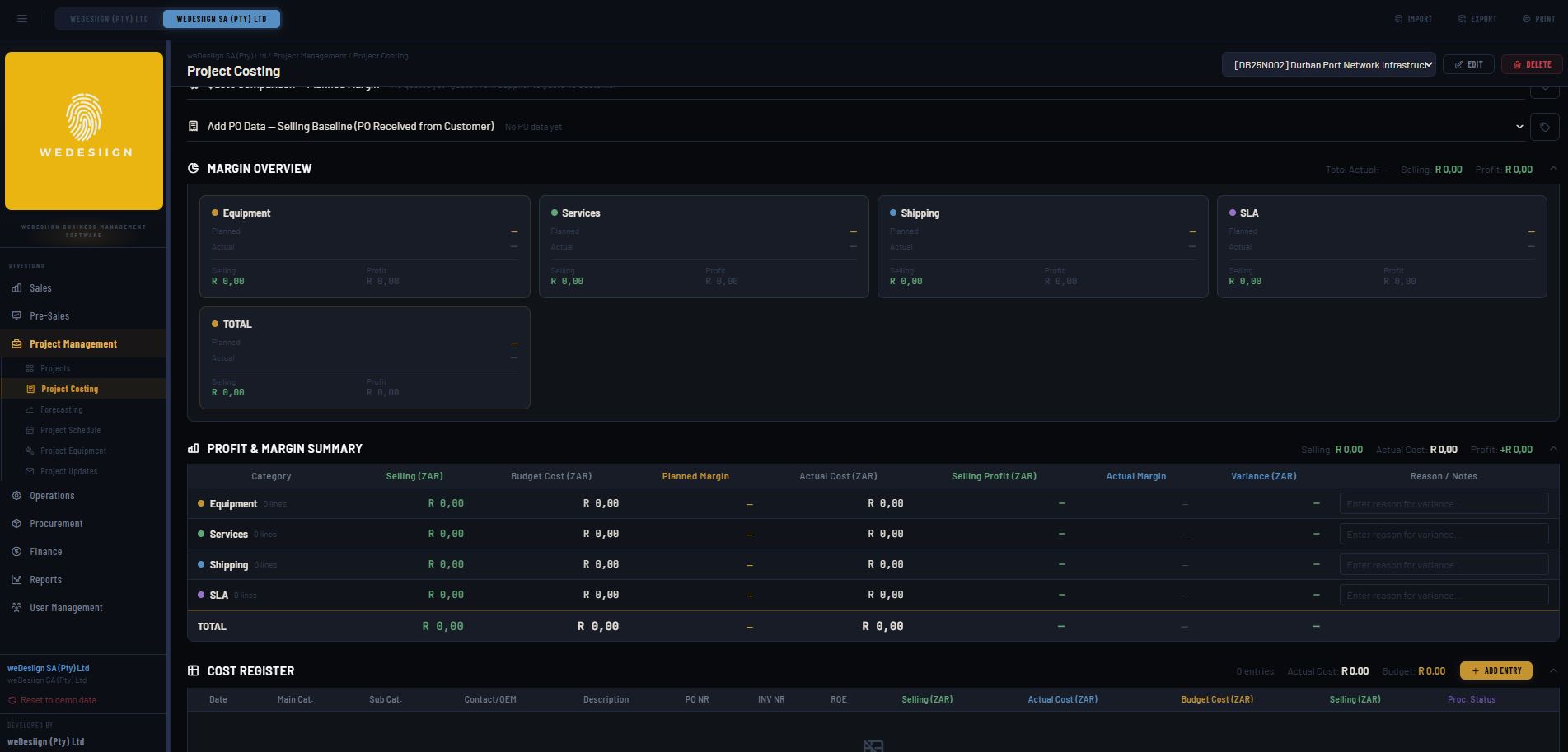
Business Management Dashboard — executive view
Type
Custom web application
Departments
Seven, plus executive
Deployment
Local or international
Rollout
Phased, per department
Investment
Quoted on scope
01

The problem it solves

Most growing businesses do not lack information. They have too much of it, in too many places. Sales keeps a pipeline in a spreadsheet, pre-sales quotes from a template on someone's desktop, project managers track progress in a chat group, procurement works off emailed purchase orders, and finance rebuilds all of it at month end to find out what the business actually earned. Every handover between departments is a retyping exercise, and every retyping is a chance to be wrong.

The cost is rarely a single dramatic failure. It shows up as a quote that went out at last year's rates, a project that ran over because nobody saw the variation order, stock ordered twice, an invoice raised a month late, and an owner making decisions on figures that are three weeks old.

This dashboard was built to close those gaps. One record of a client, a quote, a project, a purchase order and an invoice, entered once and visible to every department that needs it, at the level of detail that department needs.

02

Every department, one system

Each module is a working environment for the people in that role, not a report about them. Data entered in one flows to the next without a hand-off.

Sales
Pipeline by stage and value, client and contact history, activity logging, win and loss reasons, targets against actuals per rep. A closed deal becomes a project without anything being re-entered.
Pre-Sales
Estimating and quoting off a controlled rate library, revision history on every quote, margin visible while you build it, and approval routing before a number leaves the business.
Project Management
Scope, programme, milestones, resource allocation, variation orders and progress claims. Budget against committed and actual cost on the same screen as the schedule.
Operations
Job cards, site and team scheduling, timesheets, equipment allocation, and completion sign-off with the evidence attached to the job rather than sitting in someone's inbox.
Procurement
Requisition to purchase order to goods received, supplier records and pricing, committed cost per project the moment an order is raised, and three-way matching against the invoice.
Finance
Invoicing and credit notes, debtors and creditors ageing, cash position, cost centre reporting, and project profitability that reconciles to the operational data instead of being rebuilt from it.
Executive dashboards
Revenue, margin, pipeline coverage, work in hand, utilisation and cash on one screen, per entity or consolidated, drillable from a headline figure down to the transaction behind it.
Administration
Roles and permissions per department, audit trail on every change, document storage against the record it belongs to, and configurable approval limits.
03

Local and international, on your terms

Independent by default
Two entities
A local and an international operation can each run the system in full isolation: own currency, own tax treatment, own users, own data. Neither depends on the other being online.
Synced when you want it
One view
Turn synchronisation on and the same records consolidate into a group-level executive dashboard, without forcing either entity onto the other's processes.
Discovery
Map the real process, department by department
Configure
Fields, rates, roles and approvals to match how you work
Migrate
Clients, suppliers, open projects and balances brought across
Pilot
One department live while the rest carry on as normal
Roll out
Remaining departments in sequence, with training
Support
Ongoing changes as the business changes
04

Thinking behind the design

Business systems fail on adoption, not on features. If a project manager has to open four screens to do the thing they do forty times a day, they will go back to the spreadsheet, and the moment one department opts out the whole chain of data breaks.

So each module was designed around the one task that role repeats most, with everything else a click away rather than in the way. Screens are dense where the work is dense and quiet where it is not, and nothing asks for a number the system could already know.

Executive dashboard view
Executive view

The owner's screen leads with the four figures that decide the next month: what has been sold, what is still to be delivered, what it is costing, and what is in the bank. Every one of them is drillable down to the transaction, so a surprising number can be explained in the same sitting rather than in a follow-up meeting.

Department screens

Sales sees a pipeline, procurement sees orders, operations sees jobs. They are looking at the same records from different angles, with the fields their role owns editable and the rest visible but locked. That is what keeps one department's discipline from becoming another department's admin.
Department module view
05

Built around your business, not the other way round

Off-the-shelf platforms ask you to change how you work. This is built to the process you already run, then improved where the process is the problem.

Configured to your process
Your stages, your rate structures, your approval limits, your document templates, your terminology. Nothing generic that staff have to translate in their heads.
No per-seat penalty for growing
Licensed as a system rather than per user per month, so adding a department or a branch is a configuration decision, not a budget one.
Your data stays yours
Hosted where you choose, exportable in full at any time, with a documented structure. No lock-in through a proprietary format.
Integrates with what you keep
Accounting packages, payroll, CRM, email and existing spreadsheets can feed in or read out, so you replace what is broken and keep what works.
One version of the truth
A quote, a project and an invoice reference the same record. Month end becomes a review rather than a reconstruction.
Visibility without chasing
Status is a consequence of people doing their work in the system, not a weekly report someone has to compile.
Phased, low-risk rollout
One department at a time, running alongside the current process until it is proven. The business never stops trading to adopt it.
It keeps developing Ongoing
The system changes as the business does. New modules, reports and integrations are added on a support agreement rather than waiting for a vendor's roadmap.